

We just shipped one of the biggest updates ever to Roo, a complete visual refresh, cheaper transactions, better wallet management, and new tools that make trading smoother than ever.
Everything below is live right now in both the web app and Chrome extension.
💰 Faster Transactions & 80% Lower Fees#
This one is huge.
We’ve upgraded Roo’s transaction infrastructure with Helius, delivering dramatically cheaper and more reliable confirmations.
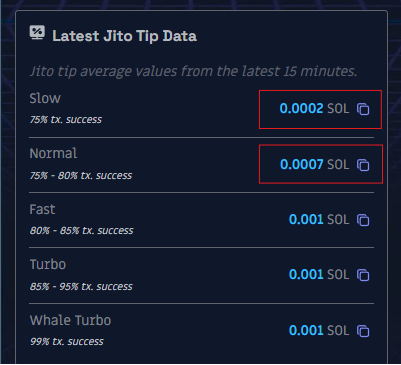
Jito Priority Fees Are Now ~80% Lower#
- Before: ~0.001 SOL ($0.20) minimum for reliable success
- Now: as low as 0.0002 SOL ($0.04) and still confirming smoothly
That’s an 80% reduction in costs per trade.
What It Means for You#
- More profitable trades
- Lower cost per execution
- Better consistency during volatile market moves
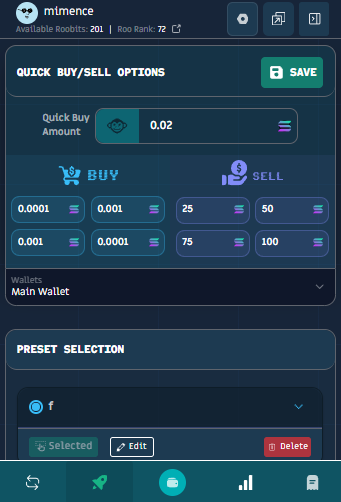
🧩 Complete Redesign of the Chrome Extension#
Expect a cleaner layout, better navigation, and a more modern feel throughout.
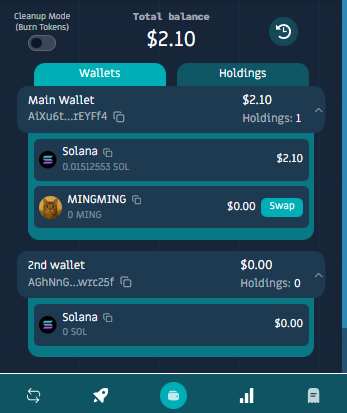
🔢 Total Multi-Wallet Balance at a Glance#
No more mentally adding balances from multiple wallets.
The extension now shows your combined holdings across all wallets instantly.
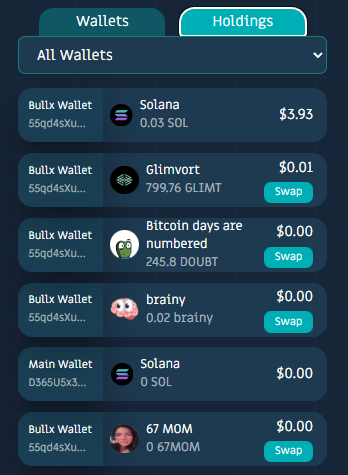
📦 All Tokens Detected, Even External Purchases#
Tokens you purchased outside of Roo now appear in your extension’s portfolio.
This means your Roo extension finally works as a full portfolio tracker, not just a trading interface, showcasing all of your holdings accross multiple wallets.
💰 Simple Trading Mode (Manual Trading Made Easy)#
Not every trade needs automation.
Simple Trading Mode gives you a clean, manual trading interface when you want full control.
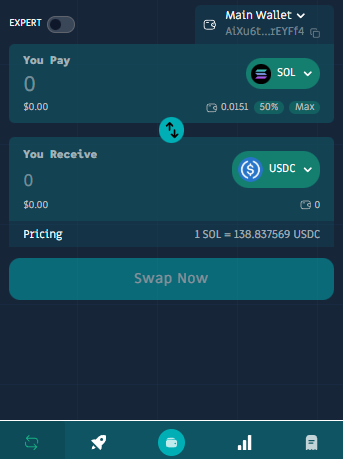
You can:
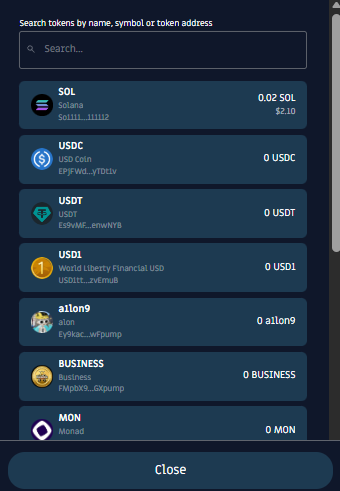
- Trade any token: SOL, USDC, USDT, or any other pair
- Search by symbol or name
- Browse trending tokens
- Execute trades instantly
🔥 Burn Token Accounts & Reclaim Trapped SOL#
If you’ve traded on Solana for a while, you definitely have a pile of tiny dust tokens sitting around.
Each burned token account returns a small amount of SOL rent. The exact amount varies by account, but it can easily add up. Even a few tokens can return meaningful SOL.
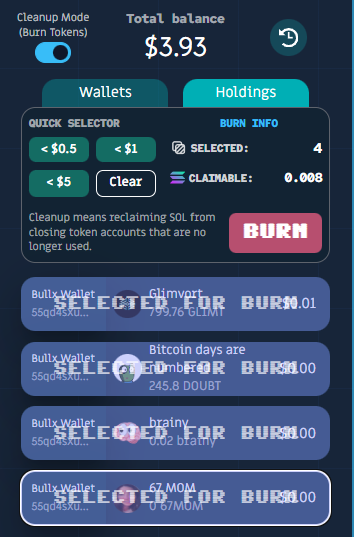
Token Burning lets you instantly delete these dead accounts and reclaim your SOL.
How to Use It#
- Open the Roo extension
- Go to the wallets page
- Click the “Cleanup Mode” toggle
- Select the tokens you want to burn
- Click the BURN button -> Your SOL rent is returned instantly
🎨 Fresh Visual Design Across the Platform#
The entire Roo experience: dashboard, trading panels, extension, and UI flows - just got a clean visual overhaul.
Everything is now:
- Faster
- More consistent
- More modern
- Easier to navigate
🎥 Creator Campaign is LIVE#
Want to earn money creating content about Roo?
We just launched our Whop Creator Campaign, where you can earn money by creating content about Roo.
- Open to all creators
- No minimum follower requirements
- Simple onboarding and transparent tracking
- Currently available for TikTok and YouTube
📚 Learn More#
Want to trade smarter?
Explore the Glossary for simple explanations of all key trading concepts, from liquidity and slippage to automation, portfolio management, token mechanics, risk tools, and more.
Looking for more educational content?
Visit the Articles page to explore all Roo guides, updates, trading strategies, and platform announcements in one place.
More in-depth guides are on the way!
🔔 Push Notifications#
Stay updated automatically with push notifications for:
- Filled trades
- Position updates
- Platform-wide announcements
- Leaderboard achievements
Enable them in your settings to stay connected.
🚀 Get Started#
Update your extension:
Chrome Web Store →
Start trading:
roo.trade →
Need help?
- Discord: discord.gg/sniperoo
- On-site chatbot
- Email: support@sniperoo.org
Happy trading! ✨